
If you're searching for Obsidian alternatives to track your work achievements, here's the direct answer: a privacy-first career intelligence app is what you need, not another note-taking vault. Look At You Go is built specifically for this job. You get complete data control (no employer access, ever), exportable evidence packs in PDF or CSV, and a 90-second weekly voice check-in that turns your work into review-ready proof.
Why does this beat a manual system? Because quantifying your wins with real metrics is what actually moves the needle in raise conversations, and a folder of scattered markdown files won't do that work for you. Three reasons this approach wins:
- Privacy: your records stay yours, not your employer's.
- Structure: every entry captures metrics, context, and evidence.
- Speed: 90 seconds a week beats hours of quarterly scrambling.
Key Takeaways
A privacy-first, voice-driven career intelligence app produces stronger review evidence in less time than a manual note-taking system ever will.
| Point | Details |
|---|---|
| Quantify every entry | Replace vague bullets with numbers, dollar figures, or before/after context. |
| Use a structured template | Track date, impact, skills, and supporting evidence for every win. |
| Keep the routine short | A 90-second weekly voice check-in beats hours of quarterly reconstruction. |
| Save your evidence | Store praise emails, screenshots, and links tied to each accomplishment. |
| Choose Look At You Go | It combines privacy-first storage, voice capture, and exportable evidence packs built for reviews and raises. |
Table of Contents
- Why Obsidian Falls Short as an Achievement Tracker
- What Should You Look for in an Achievements-Tracking Tool?
- How Do You Document Achievements With Measurable Impact?
- What's a Simple Weekly Routine for Capturing Wins?
- How Does Look At You Go Meet These Criteria?
- Why Voice Capture Beats a Manual Vault
- Get Your Evidence Pack Ready Before Your Next Review
- Frequently Asked Questions
- Sources
Why Obsidian Falls Short as an Achievement Tracker
Obsidian is a fine tool for building a personal knowledge base. Markdown files, backlinks, a graph view. But none of that was designed to answer the question your manager asks in March: "What did you actually accomplish this year?"
You end up doing double duty. First you write the note. Then you have to hunt through tags and folders to rebuild a coherent story before your review. Obsidian has no built-in export format for a one-page evidence summary, no prompts to capture metrics, and nothing that nudges you to log a win the week it happens instead of six months later when the details are fuzzy. That gap is exactly what career intelligence tools like Look At You Go were built to close.
What Should You Look for in an Achievements-Tracking Tool?
Not every note app or productivity tool is built for career documentation. Six criteria separate the ones worth your time from the ones that'll just become another abandoned tab.
- Privacy and data control. Who can see your entries? A tool that syncs to a company drive or integrates with your employer's systems defeats the purpose.
- Export formats and evidence-pack features. You need a PDF or CSV you can hand to a manager, not a wall of linked notes.
- Capture speed and modality. Voice, mobile, or browser capture beats sitting down to type a formal entry.
- Structured outputs. Metrics, before/after framing, and categories should be built into the format, not something you retrofit later.
- Search, tagging, and timeline features. You'll need to find "that Q2 project" fast when review season hits.
- Cost model and integrations. A predictable annual fee beats a patchwork of plugins you have to maintain yourself.
Each of these matters because of what happens at review time. Exportability means you can hand over a one-page evidence pack instead of narrating your year from memory. Privacy means your unfiltered reflections, including the ones about a tough manager or a project that almost fell apart, stay confidential.
Before adopting anything, ask: Who can access my records? What formats can I export? How long does setup take? And watch for red flags: no export option, employer-controlled storage, or manual-only capture that quietly dies out after week three. A structured tracker updated on a regular cadence is the baseline. Anything less isn't really a system.
How Do You Document Achievements With Measurable Impact?
Vague bullets lose negotiations. "Improved team processes" tells your manager nothing. "Cut month-end closing by 20 hours through new Excel automation, saving the company roughly $1M annually" tells them everything, and that's a real example Forbes highlights as the kind of specificity that strengthens a raise request.
Use a simple entry template every time you log a win:
- Date
- Title (what happened, in a few words)
- Quantitative impact (a number, dollar figure, or percentage)
- Before → after context
- Role or skills demonstrated
- Supporting evidence (a link, screenshot, or quote)
What counts as a metric? Revenue or ARR contribution, time saved, error rate reductions, SLA improvements, customer satisfaction scores, project completion dates, and mentorship outcomes all qualify. So does direct praise from a stakeholder.
Here are phrases to adapt:
- "Reduced customer churn by identifying at-risk accounts, saving an estimated $80K in renewals."
- "Cut vendor costs by renegotiating two supplier contracts."
- "Rebuilt the onboarding process, cutting new-hire ramp time from six weeks to three."
- "Automated a manual reporting task, saving roughly four hours per week across the team."
- "Mentored two junior analysts, both of whom were promoted."
- "Led cross-functional rollout of a new CRM adopted by three departments."
The difference between "helped the team" and "cut onboarding time in half for six new hires" is the difference between a shrug and a raise.
Save the receipts: praise emails, ticket or pull-request links, screenshots of dashboards, analytics exports. When review season comes, a well-built evidence packet should include a one-page metrics summary, a self-evaluation, two or three feedback examples, and a comparison of your current responsibilities against your original job description. Look At You Go's self-evaluation examples show what that finished packet can look like.
What's a Simple Weekly Routine for Capturing Wins?
You don't need a system that demands discipline you don't have. You need one that fits into a coffee break.
- Talk for 90 seconds. Voice-record what you worked on, what changed, and any number attached to it.
- Let it get structured. The reflection gets organized into your entry template automatically.
- Attach evidence. Drop in a link, a screenshot, or a quick note about who praised the work.
- Tag and archive. Categorize it (leadership, efficiency, revenue) so it's searchable later.
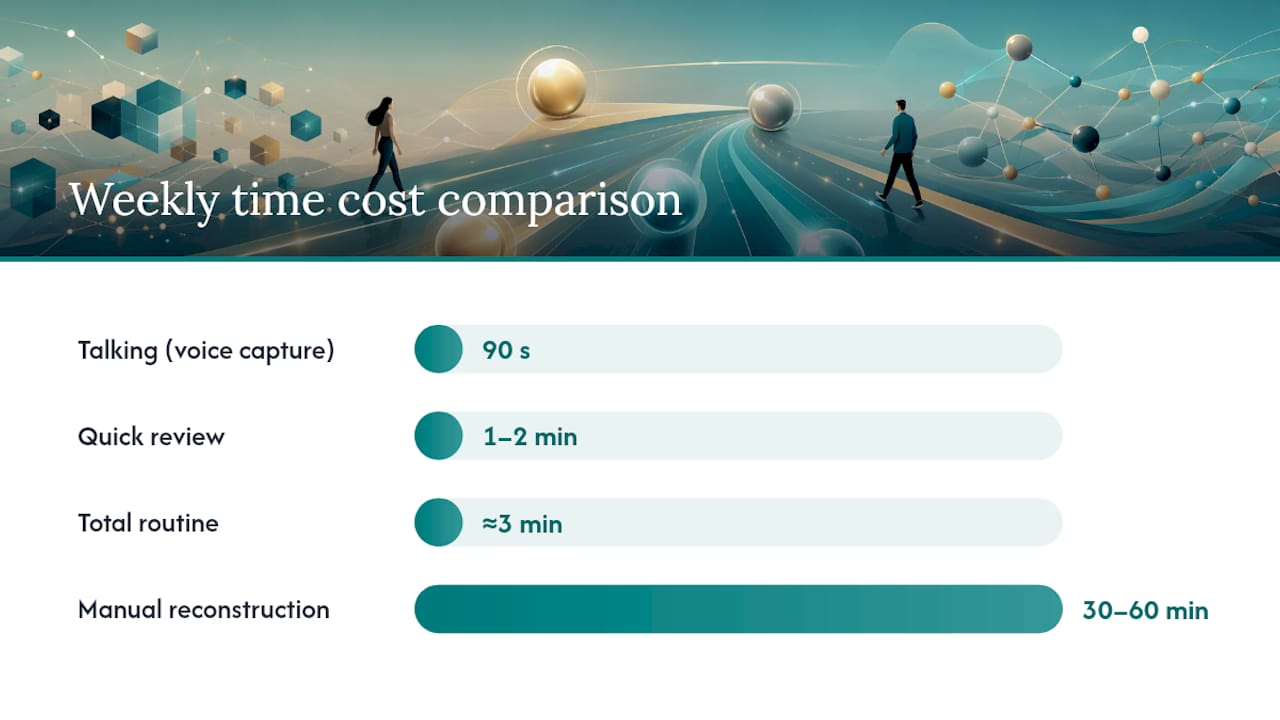
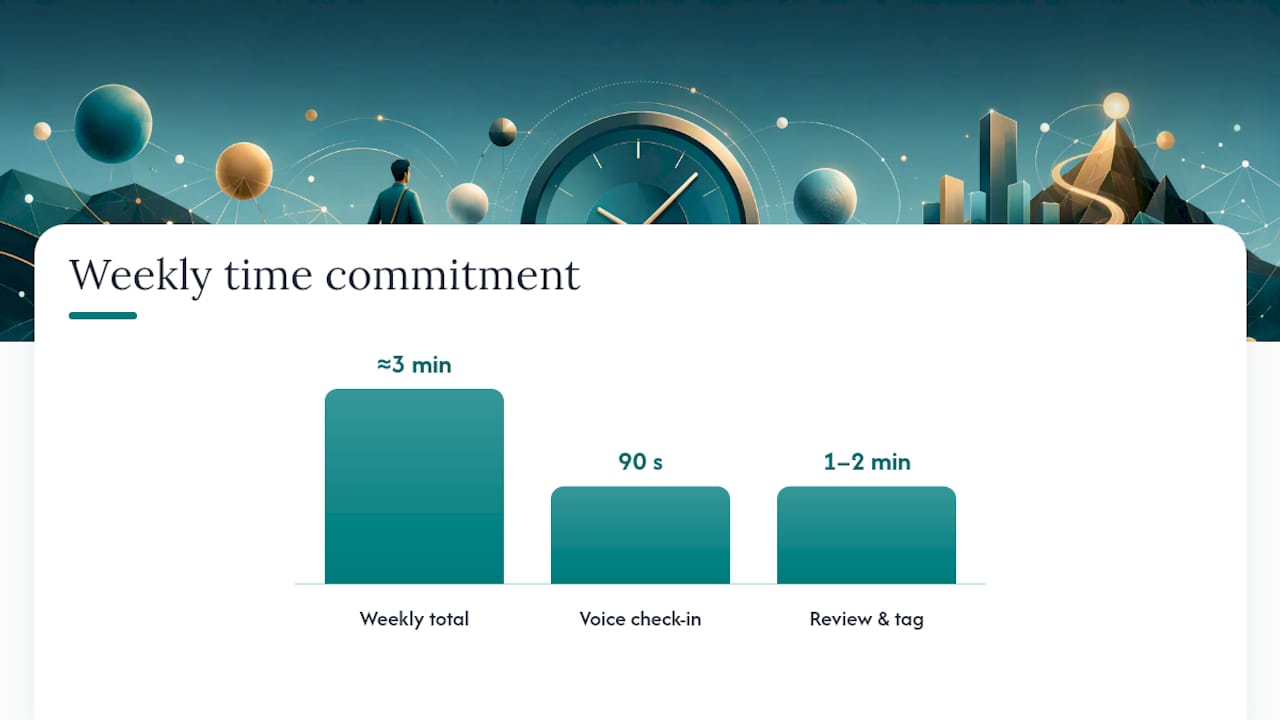
Total weekly time cost: about 3 minutes. That's 90 seconds of talking plus a minute or two of quick review. Compare that to the 30 to 60 minutes many professionals spend each week trying to reconstruct a manual brag document from memory, and the math isn't close.
Pro Tip: Set a recurring Friday-afternoon calendar reminder and keep a voice-capture shortcut on your phone's home screen. The habit sticks when the friction disappears.
Speed up capture further with a mobile voice recorder, a browser clipper for saving praise or metrics dashboards, and Look At You Go's Work Journal guide, which walks through the exact weekly rhythm.
How Does Look At You Go Meet These Criteria?
Look At You Go maps directly onto the six criteria above, which is exactly why it works as a career-intelligence alternative to a note-taking vault.
- Privacy-first data model. You maintain complete control. No employer access, no shared drive.
- 90-second voice-driven capture. Talk it out weekly; structure happens automatically.
- Structured work journal templates. Metrics, context, and skills get organized, not just dumped into a note.
- Exportable evidence packs. PDF, CSV, or a shareable one-page summary, ready for a manager or interviewer.
- Search and tagging. Find any accomplishment by category, date, or keyword in seconds.
Users maintain sole control over their records, which means you can build an honest, unfiltered account of your year and still walk into a review with a polished, professional summary.
Setup takes minutes, not hours. The app runs on a straightforward annual subscription, detailed on the pricing page, with no plugins or integrations to configure yourself.
Why Voice Capture Beats a Manual Vault
Manual note-taking asks you to remember, structure, and format your own wins after the fact. That's backwards. The best time to capture a win is the day it happens, while the number and the context are still sharp in your head, not three months later when you're squinting at a calendar trying to reconstruct what actually shipped in February.
I've seen the pattern play out the same way over and over: someone walks into a review with a folder of scattered notes and spends the first ten minutes just trying to remember what they did. Compare that to someone who's been doing a 90-second weekly check-in. They walk in with a finished evidence pack and spend the meeting talking about the raise, not reconstructing their year.
Keeping that record private isn't a nice extra. It's a basic career-safety practice. Your reflections should serve you first.
Get Your Evidence Pack Ready Before Your Next Review
Waiting until review week to build your case means scrambling through emails and half-remembered wins. Look At You Go is the alternative to a manual tracker for this exact problem: instead of retrofitting a note-taking app into a career tool, you get one built for it from the start, with 90-second weekly voice check-ins that quietly build your evidence pack in the background.
You get privacy by design (your records stay yours, never your employer's), exportable PDF and CSV evidence packs, and structured templates that turn "I helped the team" into a metric-backed statement. It suits professionals heading into a review cycle, prepping for a raise conversation, or polishing an interview story, without the overhead of maintaining a personal wiki.
Check the pricing page to see the plan, or start your first 90-second check-in with the Work Journal guide this week.
Frequently Asked Questions
Is Look At You Go a real Obsidian replacement for career tracking? For achievement documentation specifically, yes. It replaces the manual work of structuring and exporting notes with a built-in weekly capture routine and ready-made evidence packs.
What are the best free Obsidian alternatives for this purpose? Free note apps can hold your entries, but none generate structured, exportable evidence packs automatically. If cost is the main concern, weigh the hours saved at review time against a modest annual subscription.
How is this different from Obsidian vs Roam for note-taking? That comparison is about knowledge management, linking ideas and building a personal wiki. This is about a different job: quantifying your work and packaging it for a manager or interviewer.
Do I need to migrate old Obsidian notes? Not necessarily. Start fresh with your weekly check-ins going forward. Past achievements you remember can be added retroactively using the same entry template.
How much time does this really take each week? About three minutes: a 90-second voice check-in plus a minute or two to review and tag the entry.
Sources
A few resources worth saving alongside your tracker:
- 5 Steps To Ask For A Raise Like A Pro (and Get It) | Forbes
- Mid-Year Performance Review Prep: Get the Raise You Deserve | Top Candidate